
.png&w=1920&q=75)
목차
- Tip 1. Sort out your key selling points before making the detail page
- Tip 2. Turn a single product photo into a full set of detail page images
- Tip 3. Plan images and sales copy together to cut down on edits
- Tip 4. Go from a single product photo to a finished detail page with Draph Art
- Tip 5. Boost Both Production Efficiency and Conversion Rates
- FAQs (Frequently Asked Questions)

About 30 minutes left until off-work time, the team leader suddenly asks, "You can get this new product detail page ready by tomorrow, right?"
This is a very familiar scene for a small marketing team. A single new product detail page might just look like one more task added to the to-do list, but once you actually start making it, you end up dealing with product images, usage shots, key selling points, sales copy, and constant design tweaks all at once. At the same time, you've got to handle other marketing stuff like ads, social media, and promo planning too.

For a team with limited hands, the role of detail page AI isn't to replace marketers, but to cut down on repetitive creation tasks. Draph Art is an AI-powered tool that automatically creates shopping mall detail pages. With just one product photo, you can expand it into stylized product images, real-life usage scenes, product detail shots, feature highlights, sales copy, and a fully finished detail page structure. Plus, it automatically drops your content into templates featuring the latest e-commerce design trends, helping small marketing teams build new product detail pages faster and way more efficiently.
💡 TLDR for busy folks (3-Line Summary)
|
Tip 1. Sort out your key selling points before making the detail page
What actually takes up the most time when making a detail page isn't the design itself, but not being totally clear on "what should we highlight most about this product?" halfway through the project. For example, if you figure out a better selling point only after making a bunch of product images and writing the sales copy, you'll have to redo not just the images and copy, but the whole layout of the detail page. For small teams with limited staff, these constant do-overs are the main reason detail page creation takes forever.
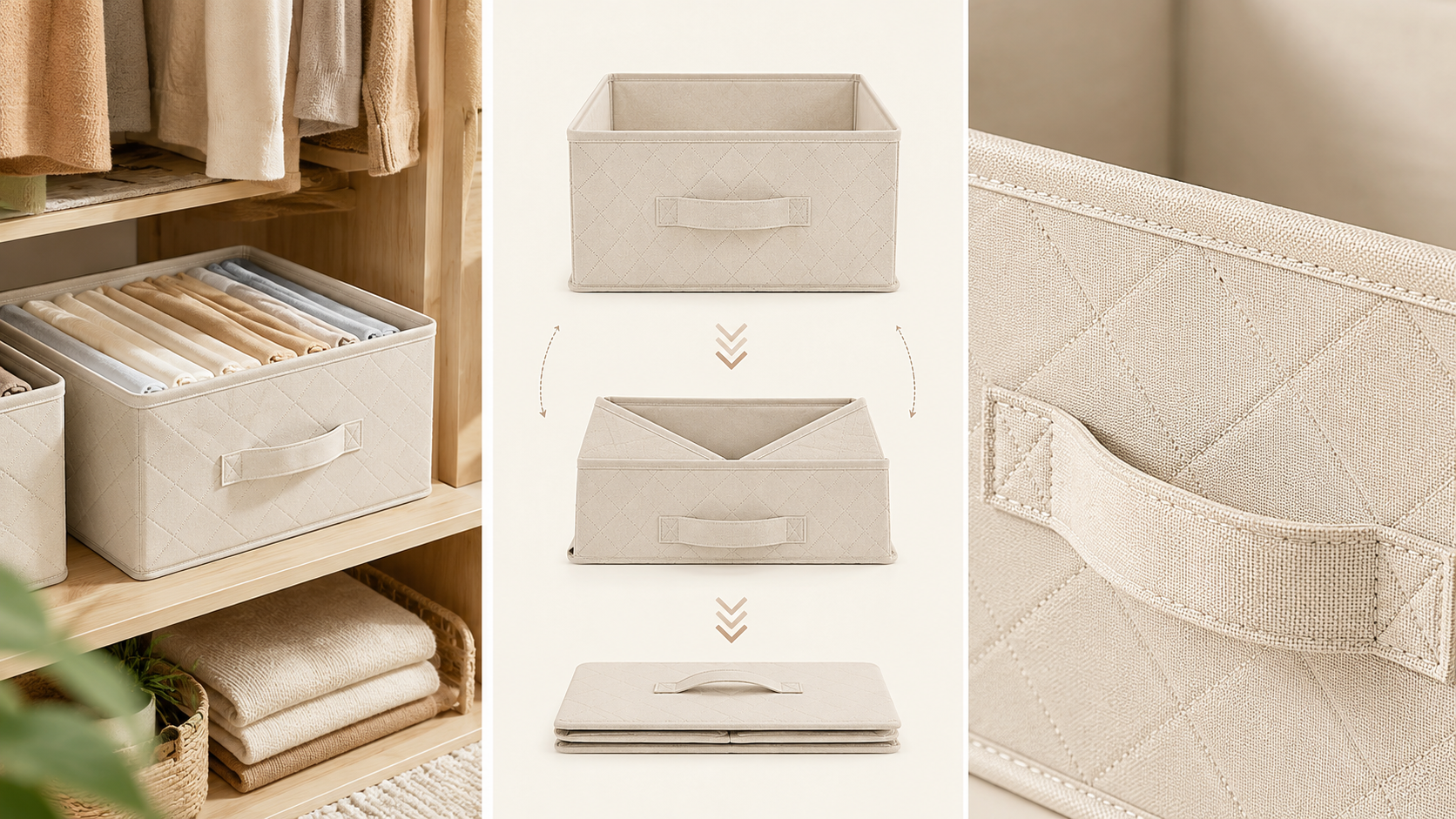
So, before you start making a product detail page, it's best to figure out what the product's most important features are, what kind of problems it solves for customers, and what makes it stand out from similar stuff. Once you pick 2 to 3 key selling points and plan out which ones to show as real-life usage shots, which ones to explain with feature images, and which ones need close-up product details, it gets way easier to pull your product images, sales copy, and design together in one direction. For a marketer, step one isn't making the page look pretty—it's deciding what the absolute most important message is. Checking out the basics of detail page creation and how to boost conversion rates can also help you organize your selling points and info layout much better.
Tip 2. Turn a single product photo into a full set of detail page images

Gathering visual materials takes up a huge chunk of time when building a new product detail page. Besides your basic product shots, you might need lifestyle images, model usage shots, feature breakdown images, detail shots, and product mood shots in various vibes. If you have to plan a new photo shoot, find a location, get props, and do post-processing every single time you need to add content to your page, it's going to be a massive burden for a small marketing team. Especially if your product photo has a messy background or needs to be reused across multiple detail page images, BG Removal lets you cleanly separate the product first, making it way easier to use later for product mood shots or usage scenes.

Lately, you can use AI product image tools like AI image generation sites to expand a single clear photo that shows off your product's look and colors into all kinds of visual content for your detail page. For example, storage items can be placed in a closet or on a desk as a usage shot, while kitchen tools can show actual cooking moments, hands holding the product, and material close-ups. For furniture, you can show different room setups so customers can easily picture the style and vibe. The key here isn't to completely replace actual product photography, but to cut down on the repetitive extra shoots you used to need for extra detail page images. For small marketing teams constantly churning out new products, just expanding detail page images from existing product photos can directly slash production time.
Tip 3. Plan images and sales copy together to cut down on edits
If you prepare images and sales copy separately while building a product detail page, your visuals and key selling points often end up mismatched. If you write the copy only after making all the images, you might find out the important info didn't make it into the pictures, forcing you to redo the images, the copy, and the whole page. For a small marketing team, this kind of back-and-forth doesn't just waste time on the detail page—it messes with your other marketing work too.
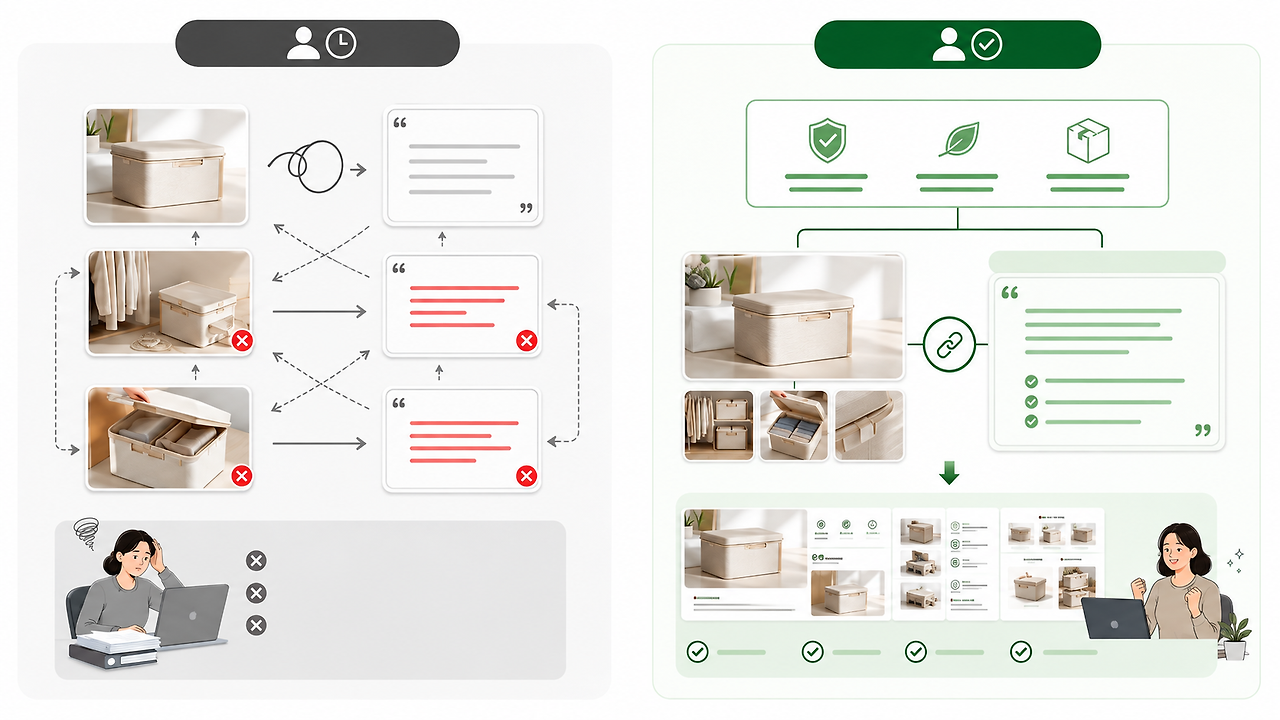
So, for more efficient product detail page creation, it's best to outline the core info each section needs to deliver before you touch the design, and prep your product images and sales copy to match. That way, your visuals, copy, and detail page design all center around the same selling point, making everything flow better together and cutting way down on late-stage edits.
For a small marketing team, boosting detail page efficiency isn't just about designing faster. It's more about making sure your images, copy, and page content are all pulling in the same direction from day one to avoid unnecessary do-overs.
Tip 4. Go from a single product photo to a finished detail page with Draph Art
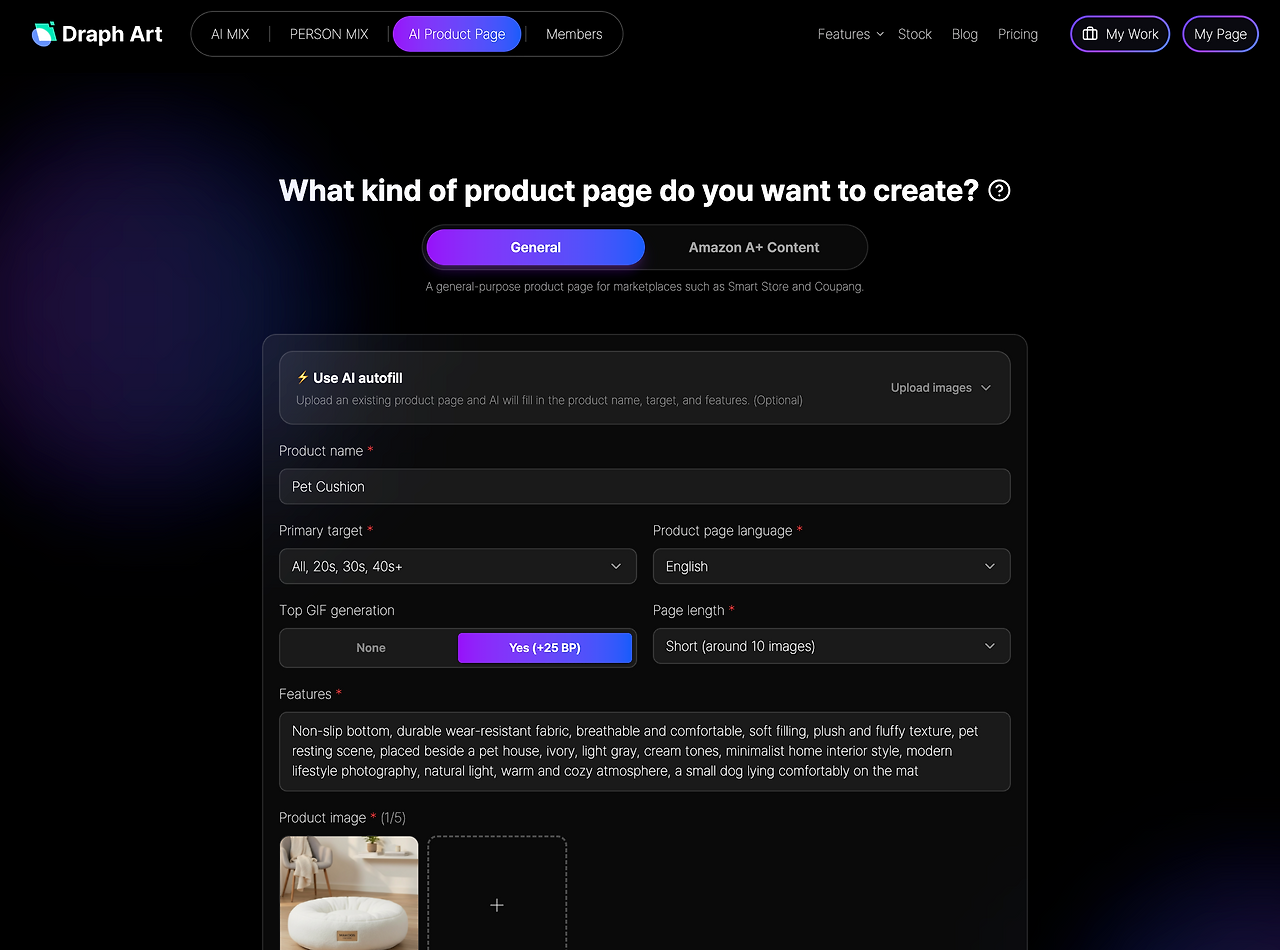
Draph Art is an auto-generation AI tool built for making e-commerce product detail pages. Just upload a clear product photo, drop in basic info like the product name, key features, and specs, and it'll whip up product mood shots, real usage scenes, feature breakdown images, product detail shots, sales copy, and a fully finished detail page layout.
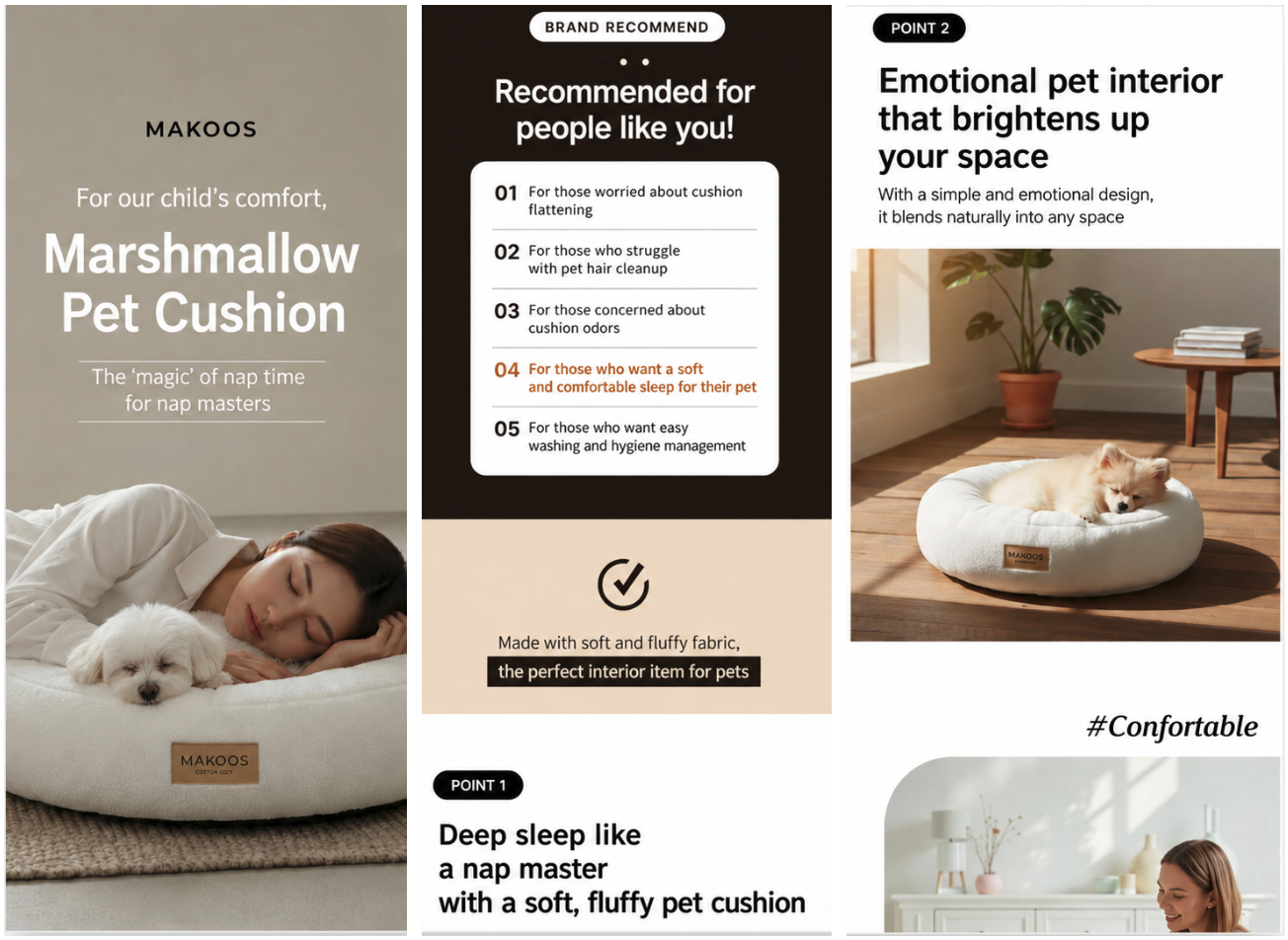
The generated images, copy, and page content are automatically dropped right into detail page templates packed with the latest e-commerce design trends. That means marketers don't have to waste time handling photo shoots, image design, copywriting, and page layouts separately—you can quickly get a conversion-ready detail page done.
If you want to tweak a specific image or piece of text, you can just regenerate that exact part without having to rebuild the whole page from scratch. For small marketing teams that have to drop new products all the time, handling what used to be a messy detail page process in a single tool lets you finish new product content way faster and manage your product launch schedules smoothly.
Comparing Detail Page Production Methods for Small Marketing Teams
| Comparison Item | Traditional Detail Page Creation | AI-Powered Detail Page Creation |
| Key Selling Points | Often added or modified on the fly during production | Sorted out before production to keep the content direction unified |
| Product Images | Requires extra photo shoots and designs for every usage, feature, and detail shot | Expands various detail page images based on a single product photo |
| Sales Copy | Created separately after making the image, which can lead to a mismatch between the image and the copy | Organize product images and sales copy together based on the same selling points |
| Detail Page Design | Arrange and layout the page after finishing the images and copy | Automatically place generated content into detail page templates |
| Revisions | You have to tweak images, copy, and pages separately, which leads to a lot of repetitive work | Easily edit or regenerate just the images or copy you need |
| Production Efficiency | Shooting, images, copywriting, and design tasks are scattered across multiple steps | Connect the whole detail page creation process into a single smooth workflow |
Tip 5. Boost Both Production Efficiency and Conversion Rates

For small marketing teams, cutting down the time it takes to build a detail page is a big deal. But finishing pages quickly isn't the only goal. When shoppers land on a product page, they want to quickly grasp its features, see its real-world value, and find a clear reason to buy. That's why making the final call to purchase is heavily influenced by these factors. So, while you're working on making production more efficient, you also need to make sure your images, key selling points, and page content genuinely help shoppers understand the product and drive conversions.
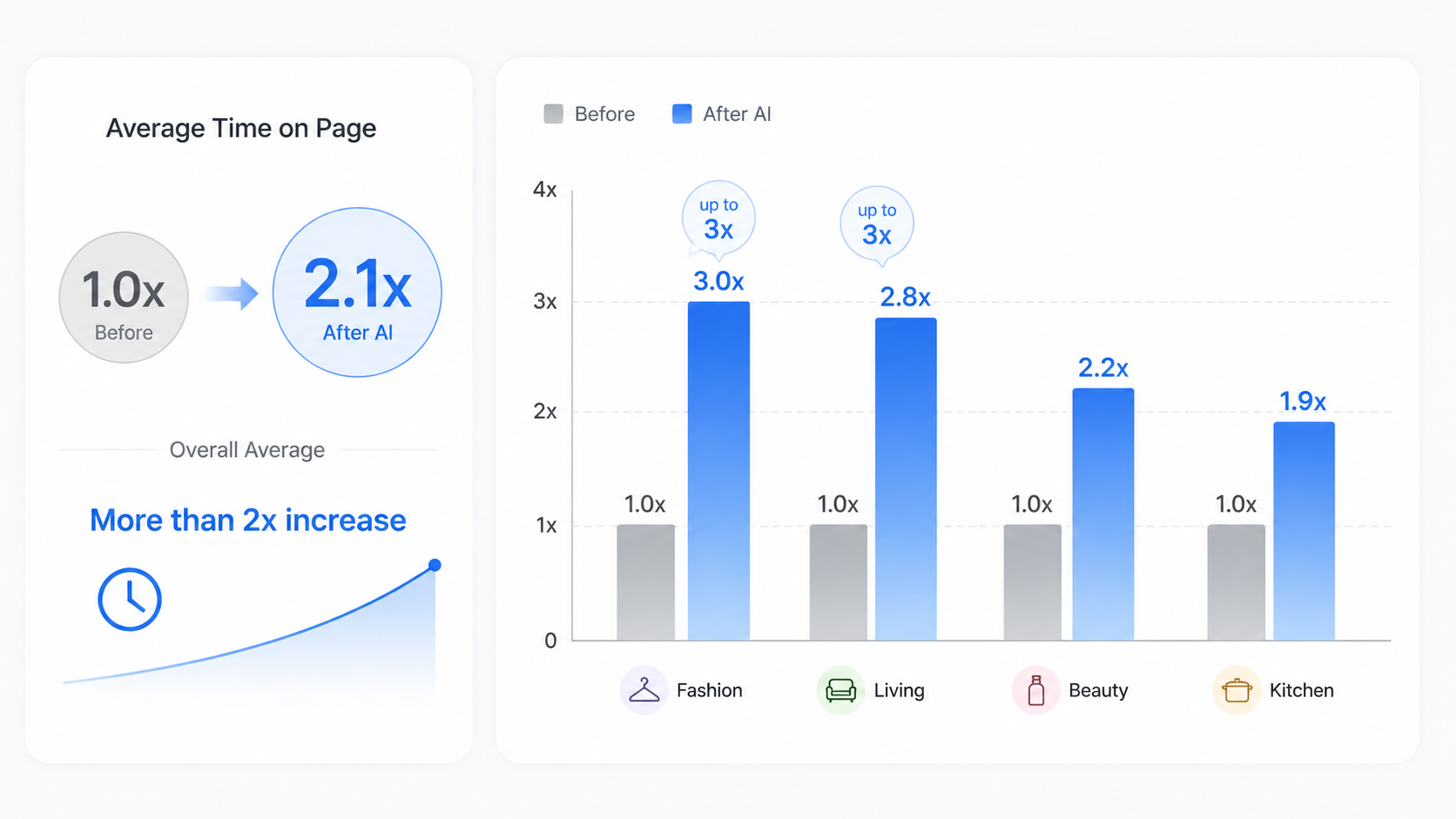
In past tests Draph Art ran with sellers across various e-commerce categories, over half of the participating sellers saw their average user dwell time double after using AI-generated detail pages, and some fashion and living categories even saw up to a 3x increase. Real results can vary depending on the product and detail page content, but for small marketing teams, the ideal AI detail page maker isn't just about saving time—it's about balancing polished content with higher conversion rates. This way, you can boost your workflow efficiency while crafting product detail pages that actually help sell.
FAQs (Frequently Asked Questions)
Q1. Can marketing teams with little design experience use AI detail page creation?
A1: Definitely. Draph Art is an AI-powered detail page generator that uses your product info and photos to create images, sales copy, and detail page layouts, then automatically places your content into templates designed with current e-commerce trends in mind. This means even small marketing teams without a dedicated designer can put together product detail pages way more efficiently.
Q2. Can I edit specific images or copy on an AI-generated detail page?
A2: Yep, absolutely. If you want to tweak any images or sales copy on the generated detail page, you can just edit or regenerate the specific parts you need. No need to start the whole detail page from scratch, which saves you a ton of time on repetitive edits.
Q3. What platforms does the generated detail page support? Can I use it right away to list my products?
A3: Currently, it supports domestic e-commerce, Japanese e-commerce, and global Amazon A+ content specifications. Especially if you're selling products on online shopping malls in Korea, you can also check out our guide on how to create Smart Store detail pages for tips on image composition and content creation. Plus, you can export them in high resolution without watermarks, so you can upload and use them on your shopping mall right away without any extra editing.

.png&w=1920&q=75)