

목차


Even beginners can easily create high-quality product detail pages using Draph Art, effectively increasing visitor dwell time by up to 3x.
Anyone who has run an e-commerce store has likely been there. You might think that as long as you take great product photos, the detail page will come together easily. But in reality, it takes a ton of time and effort to handle page planning, defining selling points, creating lifestyle images, and designing the layout. Even then, many of those pages fail to grab a shopper's attention, causing them to bounce within seconds. But now, you don't have to struggle to build a high-quality product detail page.
Draph Art is an AI-powered product detail page generator that handles everything from planning and copywriting to creating custom lifestyle images and designing layouts—all from just a single raw product photo. It analyzes your product's key selling points to structure the page, writes copy focused on driving conversions, and automatically generates high-quality lifestyle imagery and AI model photos. It even puts together the entire layout, delivering a polished, ready-to-use detail page for your online store!

💡 TLDR for those in a hurry
|
1. Why do shoppers bounce from product detail pages in just a few seconds?
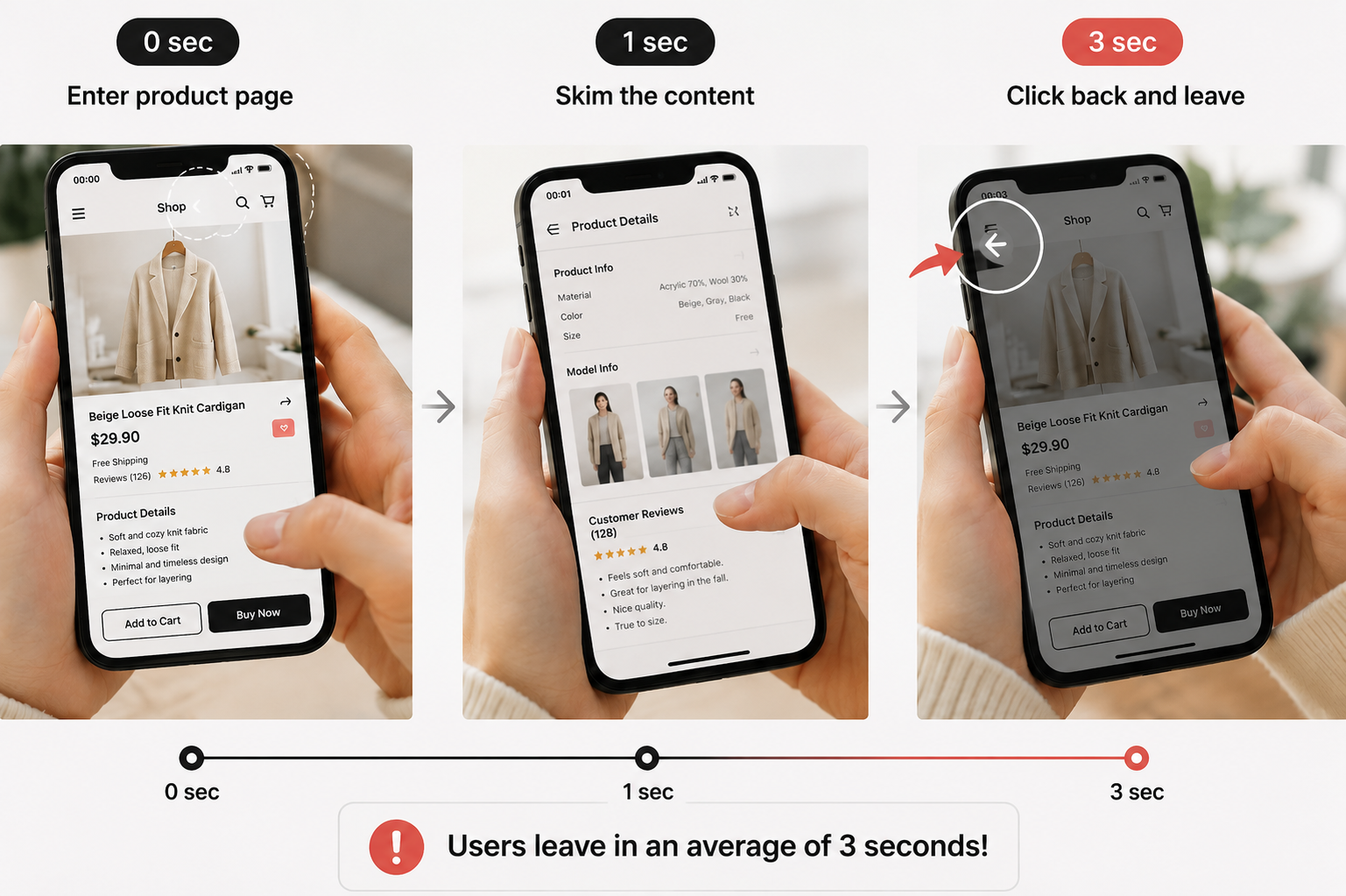
Many sellers think low sales are just due to a lack of traffic. But in reality, many shoppers who actually land on a product detail page leave within 3 to 5 seconds. The issue isn't the product itself; it’s that the detail page fails to grab the shopper's attention from the very first impression.
Shoppers open a detail page because they want quick answers. They want to know, "What is this product?", "How does it solve my problem?", and "Why should I choose this over anything else?" If your page doesn't answer these questions clearly from the start, it's only natural for them to leave.
A good detail page isn't effective just because it's long. You can only expect higher dwell time and conversions when the information flows naturally, is easy to understand, and is crafted in a way that keeps the shopper scrolling until the end.
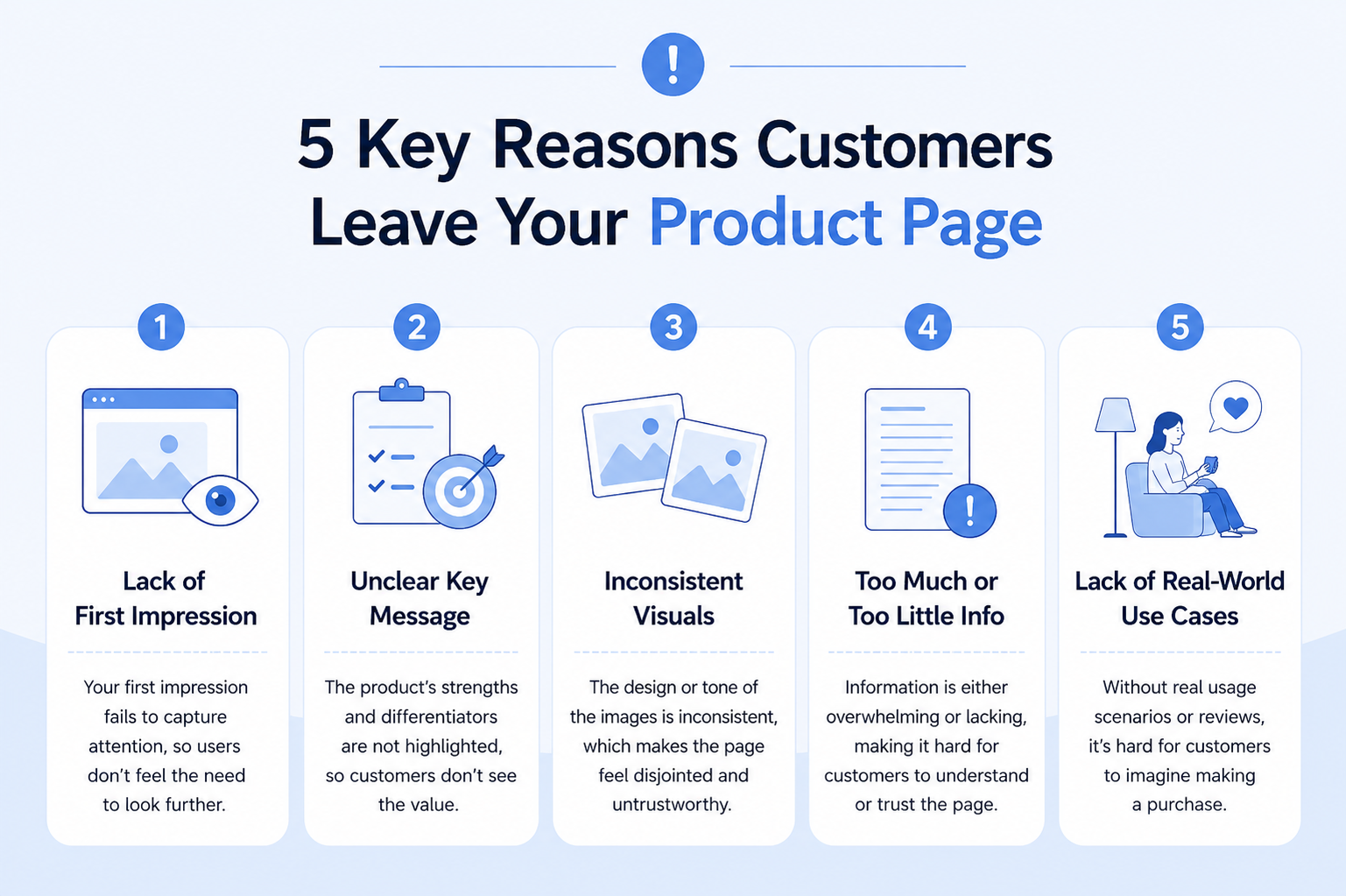
5 Key Reasons Why Shoppers Quickly Leave Product Detail Pages
- The first screen lacks appeal, failing to capture the shopper's immediate attention.
- The key selling points are vague, making it hard to grasp the product's value even after looking for a while.
- The image style is inconsistent, mixing various shots and stock photos, which makes it hard to read.
- There is either too much information or too little, making it difficult to understand.
- A lack of real-life usage scenes makes it hard for shoppers to intuitively feel how the product works.
2. The secret to increasing dwell time by 3x: What did Draph Art change?
AI optimizing a detail page isn't just about tweaking a few images. The key is completely redesigning the user's reading experience so that they want to keep scrolling until the end.
In a survey conducted among 300 e-commerce sellers across various categories regarding the 'change in dwell time after using AI-generated detail pages,' over 50% of those who switched to pages created by Draph Art reported that their average visitor dwell time increased by more than 2x. Specifically, cases in the fashion and living categories saw dwell time increase by up to 3x compared to before.
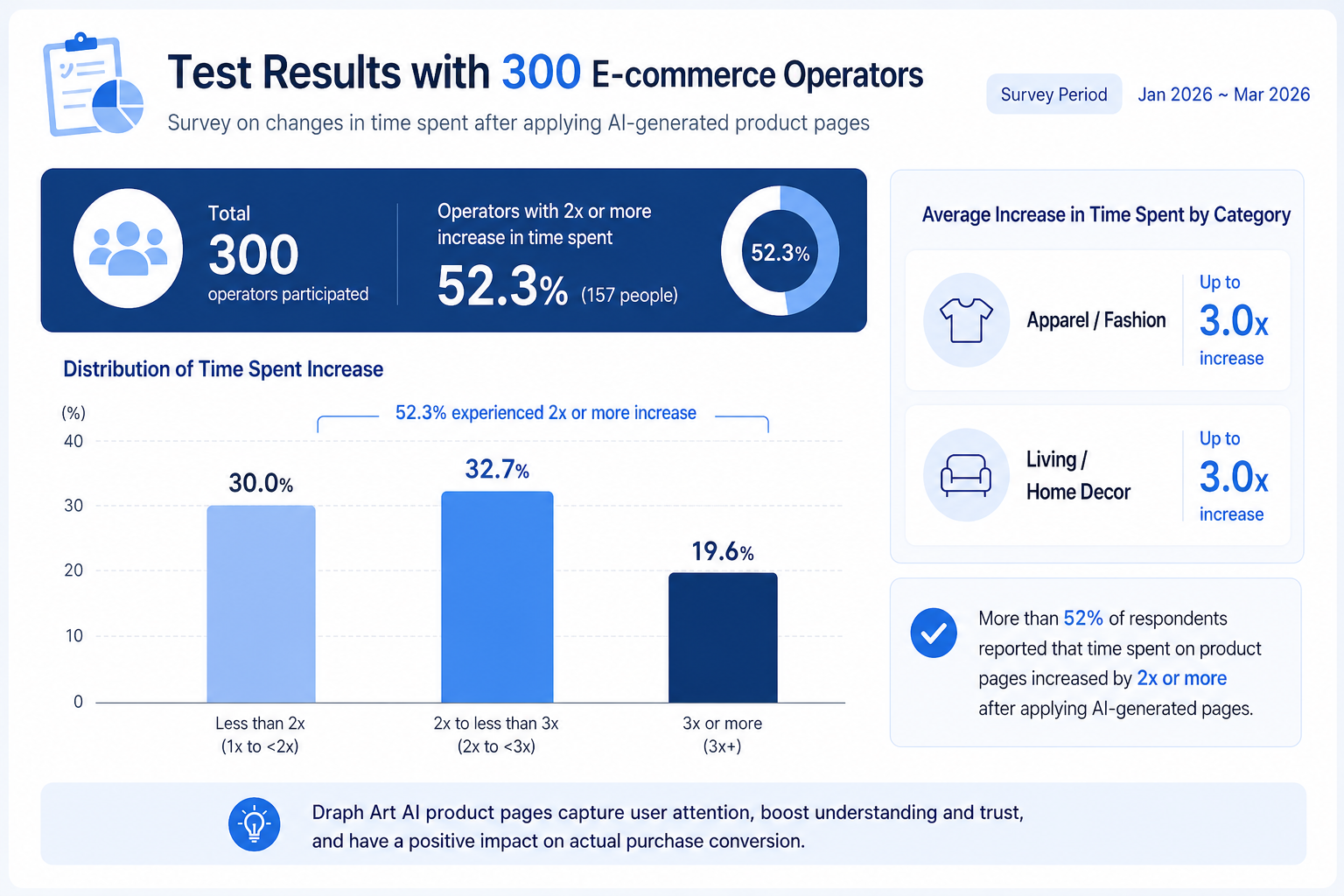
In a Draph Art test involving 300 online store operators, 52.3% experienced at least a twofold increase in customer time on page.
Among them, the fashion and home and living categories saw increases of up to threefold.
The reason for these results is that the AI resolved the issues of traditional detail pages in the following three ways:
- Redesigning page logic to match the reader's flow.
- Unifying visuals across the page to eliminate awkward image combinations.
- Automatically supplementing missing information to create a more polished, complete detail page.
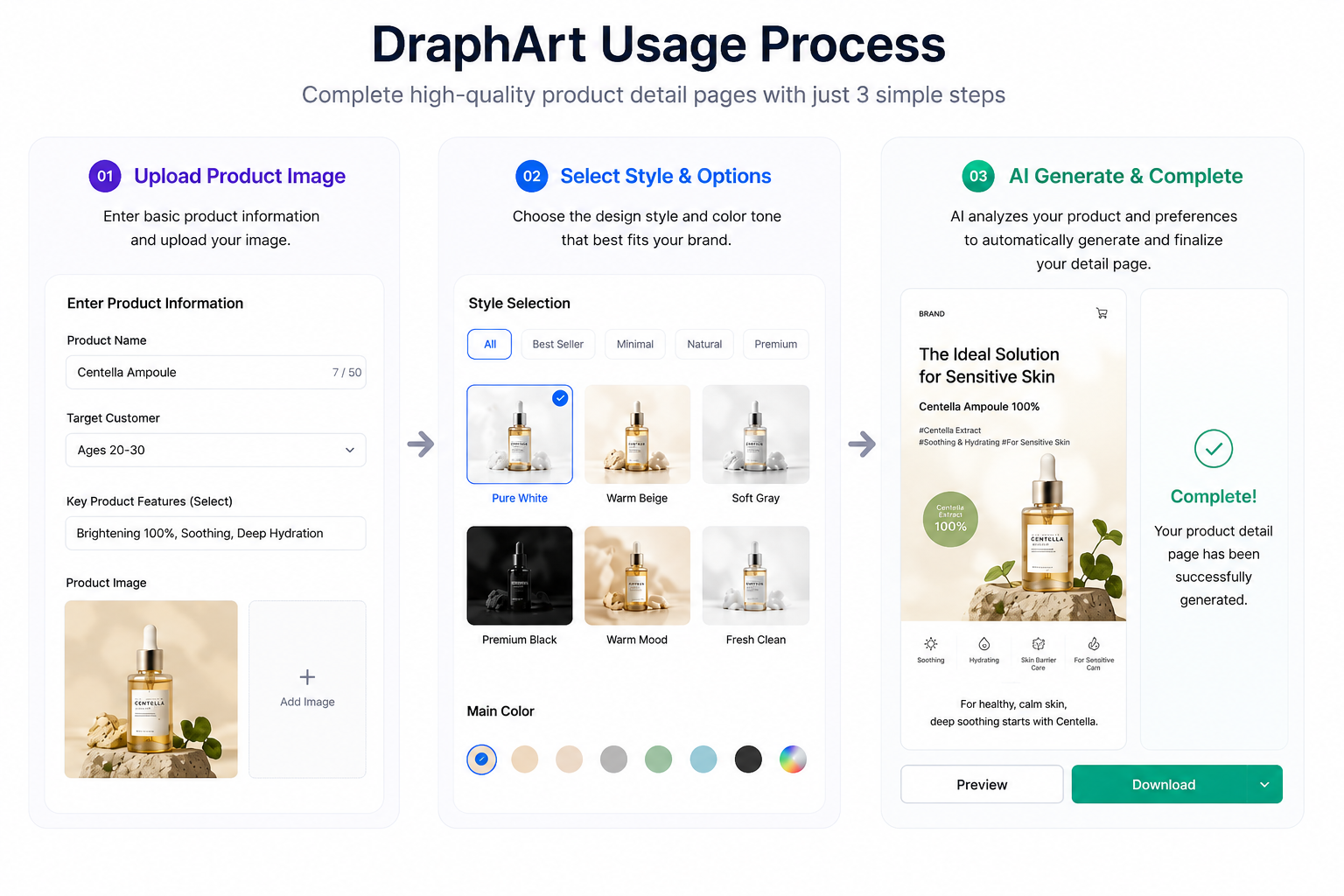
Draph Art creates a perfect detail page in 3 simple steps
Best of all, you don't need any design experience or knowledge of complex AI prompts to do all this. With Draph Art, you just need to follow these 3 steps to easily generate a high-conversion, complete detail page.
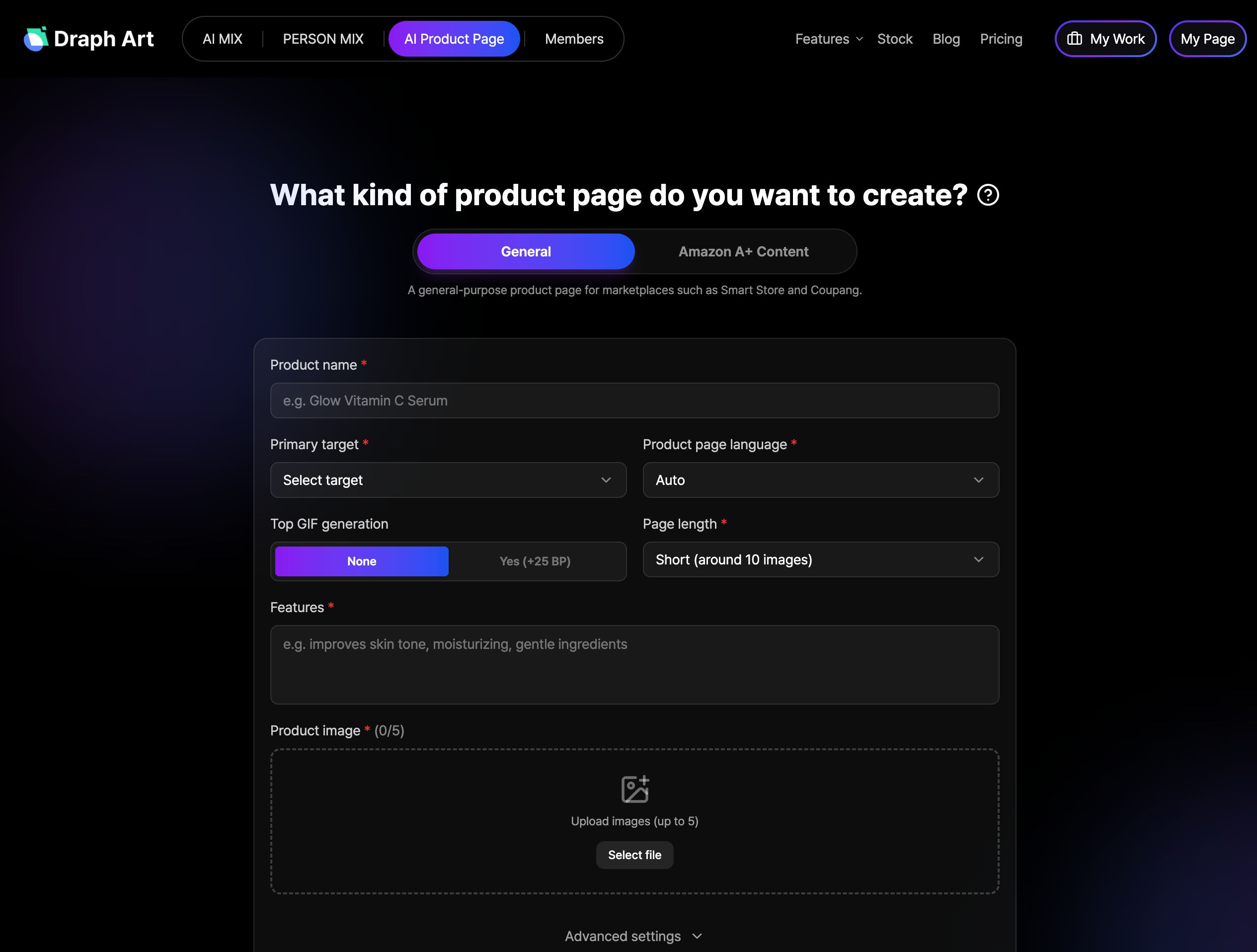
1. Upload raw materials: Upload clear product photos, then enter the product name, key selling points, and target audience.
2. Select a style: Choose your brand's main colors, reference styles, AI models, and the language for the detail page to suit your needs, whether for domestic, Amazon, or Japan e-commerce markets.
3. One-click generation and export: The AI automatically completes the entire process. If the result isn't exactly what you want, you can regenerate and edit specific modules. You can export a high-resolution detail page in just minutes and use it for product registration immediately.
3. How much difference does the way you create a detail page make?
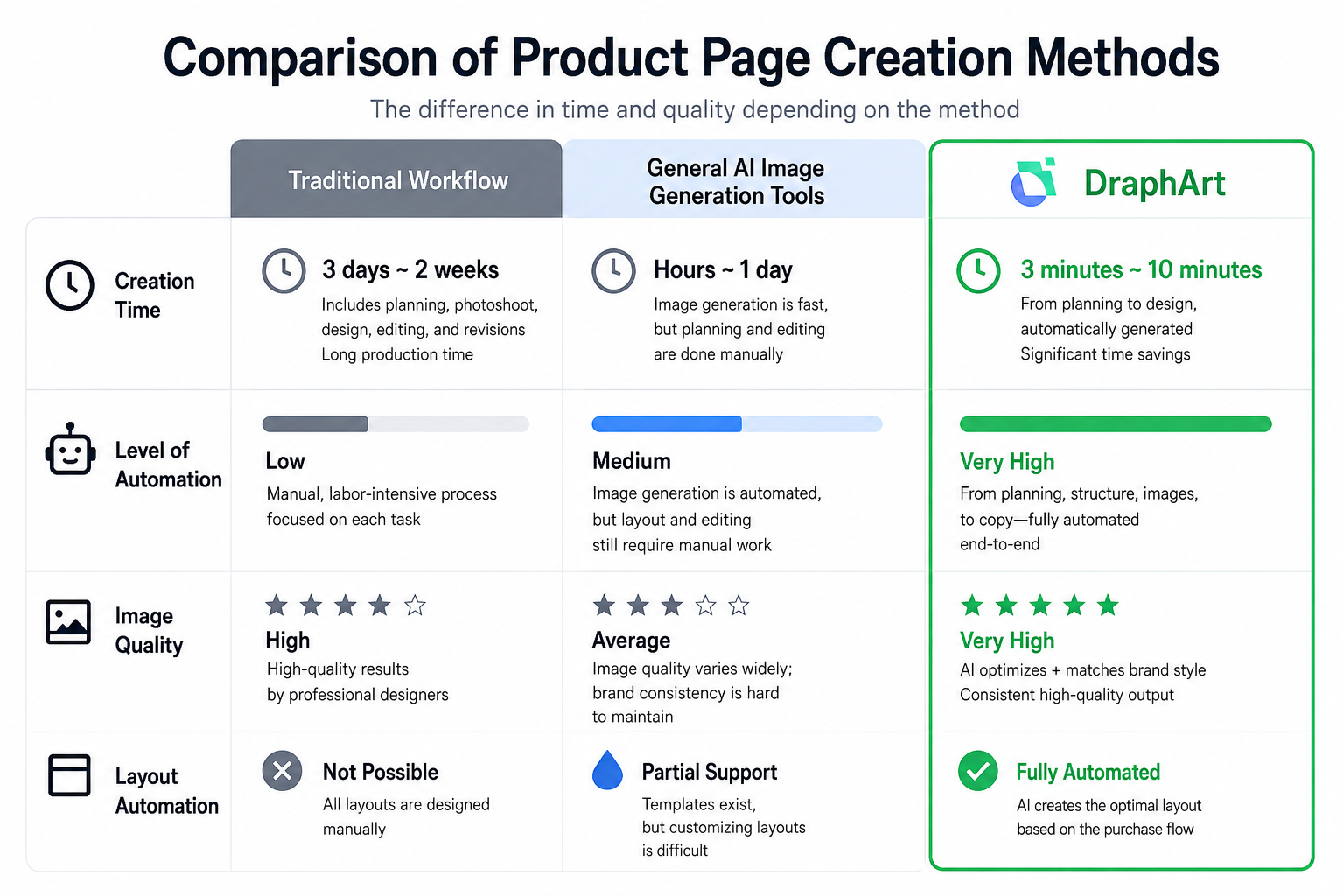
Comparison of Product Detail Page Creation Methods
There is a significant difference in time and quality depending on the method.
| Traditional Creation Method | General AI Image Generator | Draph Art | |
| Production Time | 3 days to 2 weeks Requires a long process of planning, photo shoots, design, and revisions. |
Several hours to 1 day Image generation is fast, but you still have to handle the planning and editing yourself. |
3 to 10 minutes From planning to design, the automated process saves you an incredible amount of time. |
| Automation Level | Low Inefficient process that relies heavily on manual work. |
Medium Image generation is possible, but layout and editing still require manual effort. |
Very High All-in-one automation for planning, content layout, imagery, and copywriting. |
| Image Quality | High Professional quality guaranteed. |
Average Significant variance in quality, making it hard to keep your branding consistent. |
Very High AI optimization + brand-specific customization for consistent high-quality output. |
| Layout Automation | Not Possible Designers must build every layout by hand. |
Partial Support Templates are available, but flexible layout configuration is difficult. |
Fully Automated AI automatically constructs the optimal layout based on customer purchasing behavior. |

Even beginners can finish it in 3 minutes!
Click the link below to check out how to create a high-quality product detail page yourself!
👉 [Try AI Detail Page Maker https://draph.art/en/detail-page-maker]
Frequently Asked Questions (FAQ)
Q1. I don't know how to write complex prompts and have no design experience. Can I really create a great detail page?
A1: Absolutely. Draph Art's AI Detail Page feature does not require any complex prompting skills or prior design experience. Simply upload one clear photo of your product and enter basic info like the product name and key selling points. The AI will then handle the entire process: page planning, copywriting, and layout design. You can easily customize it by selecting your brand style, preferred AI models, and brand colors. It's incredibly user-friendly.
Q2. What if I don't like the generated detail page? Is it hard to edit? Do I have to remake the whole page?
A2: You don't have to start from scratch. Draph Art supports modular editing, including Detail Page Block Editing, Chat-based Editing, and Manual Editing, allowing you to select and regenerate specific parts of your design. You can achieve your desired result in just a few minutes.
Q3. Which platforms are supported by the generated detail page? Can I use it for product registration right away?
A3: We currently support standard product detail page formats for domestic and Japanese e-commerce, as well as global Amazon A+ content standards. Plus, since you can export high-quality, watermark-free images, you can upload them straight to your online store without any extra editing.
Q4. Are there any copyright issues with the generated product detail pages and images? Can I use them for commercial purposes?
A4: All content generated on our platform comes with a license for commercial use, so you can use it without any copyright worries. Your product images are based on the actual photos you upload, and all AI-generated layouts, AI model images, and copy are produced based on e-commerce data. You can safely use them for various commercial purposes, such as promoting your shop or listing your products.

.png&w=1920&q=75)
.png&w=1920&q=75)